
In mid-December the sun sets before 4pm in London and earlier still further north, so most winter gaming happens in the dark. Playing with nothing but a bright screen in a black room is the quickest way to tired eyes, while a harsh ceiling light causes glare and washes out the picture. The fix is to light the room in layers: a soft light behind the screen, a gentle light somewhere else in the room and nothing shining directly at the display.
Here is how to set that up, what to buy if you need anything at all, and a few ideas if you are shopping for a gamer this Christmas.
Why Playing in a Dark Room Tires Your Eyes
Your eyes constantly adjust to the brightest thing in view. In a dark room that is the screen, and every time a game cuts from a dark cave to a bright menu, your pupils have to react. Over a long session that constant adjusting feels like strain. A small amount of light around the screen evens out the difference between the display and its surroundings, so your eyes have less work to do.
The opposite problem is just as common. A bright overhead light or a lamp behind you reflects off the screen, especially on glossy panels, and turns dark scenes into a grey haze. Good gaming room lighting sits between these extremes.
Start With Bias Lighting Behind the Screen
Bias lighting is a light source mounted on the back of your monitor or TV that shines onto the wall behind it. It is the single most useful change for evening gaming, and it is cheap. A USB kit such as this USB backlight LED strip sticks to the back of the screen and can often be powered from the TV or monitor's own USB port, so it switches on and off with the display.
To get it right:
- Mount it on the back, not the edges. The light should come from behind the screen and bounce off the wall. You should never see the LEDs themselves from your seat.
- Choose neutral white for the most accurate picture. Video standards use a white point called D65, roughly 6500K. A bias light close to that colour keeps the image looking as the game intended. Coloured light looks great in photos but tints how you perceive the picture.
- Keep it dim. A common guideline is that the light on the wall should be no more than about 10% of the screen's brightest white. If the glow is the first thing you notice, turn it down.
- Leave a gap to the wall. Light needs a surface to bounce off. A screen right up against the wall gives a hot spot; a screen 10 to 30cm away gives an even halo.
Bias lighting is also said to improve perceived contrast, because your eyes stay slightly adapted to the dark and blacks look deeper. It will not turn a budget panel into an OLED, but it makes dark games noticeably easier to watch.
Add a Soft Second Light Elsewhere in the Room
Bias lighting covers the screen area, but the rest of the room still needs something, or the space feels like a cave. The aim is low, indirect light that does not reach the screen:
- Position: to the side of your desk or behind the screen, never behind your own head, where it would reflect in the display.
- Bulb colour: warm white, around 2700K to 3000K, feels cosier in the evening than cool daylight bulbs.
- Brightness: enough to see your keyboard, drink and controller without hunting for them. A dimmable bulb or a lamp with a low setting is ideal.
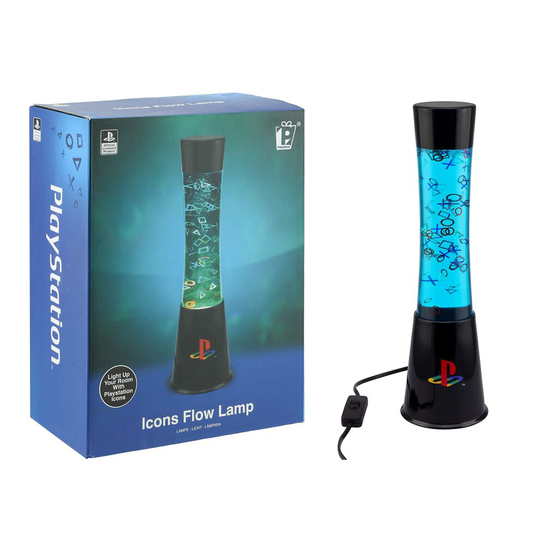
This is also where a feature lamp earns its place. A lamp that adds colour and movement, rather than lots of light, makes the room feel like a gaming den without interfering with the picture. If you or someone you are buying for is a PlayStation fan, a PlayStation lava lamp works well here: the officially licensed Icons Flow Lamp is 39cm tall, mains powered and fills its liquid tube with drifting triangle, circle, cross and square shapes. Put it on a shelf or the far corner of the desk, where it is in view but not reflected in the screen.
What to Avoid
| Common mistake | What happens | Better option |
|---|---|---|
| Only the ceiling light on | Glare on the screen, flat-looking picture | Turn it off and use bias lighting plus a side lamp |
| Lamp or window behind you | Bright reflections in dark scenes | Move the lamp to the side; close curtains in the afternoon |
| Very bright RGB strips around the desk | Distracting, tints the picture | Dim them, or keep colour effects away from the screen |
| Playing in total darkness | Eyes work harder adjusting to the screen | A dim bias light behind the display |
A quick test: sit in your usual position, load a dark scene and look at the screen with the game paused. If you can see a lamp, a window or yourself reflected in it, something needs to move.
Do Not Forget the Desk Itself
Lighting works best with a sensible layout. The monitor should sit roughly an arm's length away with the top of the screen around eye level, and the screen should face across the room relative to a window rather than straight at it or with the window behind it. Our guide to setting up an ergonomic gaming desk and chair covers heights and distances in detail, and the same position makes it far easier to control reflections.
Lighting also does not replace breaks. During long winter sessions, look at something in the distance every so often and stand up between matches. If your eyes still feel sore or dry after you have improved the lighting, it is worth having an eye test with an optician.
Gift Ideas for a Better-Lit Setup
Lighting makes a good Christmas present for gamers because it is useful, easy to fit and rarely something people buy for themselves. Some ideas by budget and type of player:
- For the console player with a big TV: a USB bias light kit sized for their screen. Check the screen size range on the box before ordering.
- For the PlayStation collector: a licensed feature lamp for the shelf or desk.
- For the PC builder: addressable RGB strips or fans for inside the case, which can be set to a dim, single colour for evening play.
- For anyone: a dimmable warm white bulb or a small side lamp, which costs little and makes the biggest difference to how the room feels.
Quick Questions
Is RGB lighting bad for gaming?
No, as long as it is not bright and directly in your line of sight. Coloured light on the wall behind the screen changes how colours look, so use neutral white there and keep the colour effects for the case, the shelf or a feature lamp.
Should the bias light be on during the day?
It matters most when the room is dark. In daylight the room is already bright enough, so most people switch it off or let it turn off with the screen.
If you change only one thing this winter, stick a bias light on the back of your screen and switch off the ceiling light for your next evening session. Then add a soft lamp to the side of the room and adjust until nothing reflects in the screen.