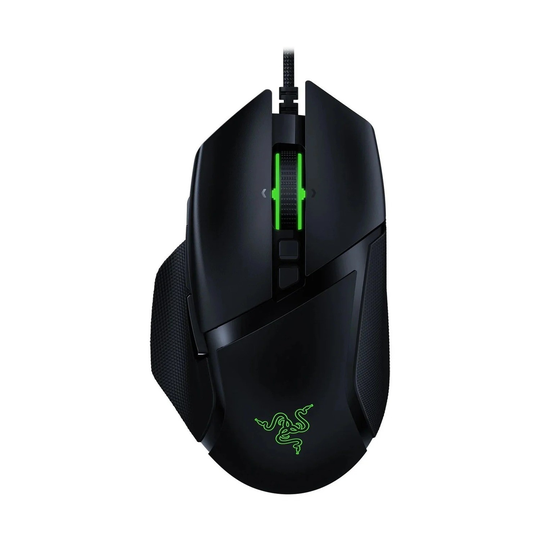
Your mouse is the part of your setup you touch most, and in many PC games it is the difference between a clean flick and a missed shot. Yet most gamers pick a mouse based on how it looks in a photo. A better approach is to start with your hand and the games you play, and only then look at the specifications on the box.
This guide walks through the features that really matter, so you can choose a gaming mouse that feels right and helps you play your best.
Start With Your Grip Style
How you hold the mouse decides which shapes will feel comfortable. Most players use one of three grips:
- Palm grip: your whole hand rests on the mouse. Larger, ergonomic mice with a pronounced hump usually suit this grip best.
- Claw grip: your palm touches the back of the mouse while your fingers arch. Medium-sized mice with a higher back often work well.
- Fingertip grip: only your fingertips touch the mouse. Smaller, lighter mice give you the most control.
Hand size matters too. If you can, measure your hand from wrist to fingertip and compare it with the length of the mouse. Ergonomic right-handed shapes, such as the Razer Basilisk V2, are popular with palm and claw players, while symmetrical shapes suit left-handed gamers and many fingertip players.
Sensor, DPI and Polling Rate
Almost every modern gaming mouse uses an optical sensor that is accurate enough for competitive play, so you do not need to chase the highest number on the box. A few terms are still worth understanding:
- DPI (or CPI): how far the cursor moves for each inch you move the mouse. Very high DPI values look impressive, but most players use a moderate setting and adjust sensitivity in the game.
- Polling rate: how often the mouse reports its position to the PC. A higher rate can feel slightly smoother, especially on high refresh rate monitors.
- Lift-off distance: how high you can lift the mouse before it stops tracking. Low-sensitivity players who lift and reposition often tend to prefer a short distance.
More important than any single figure is consistency. Pick a sensitivity, stick with it for a while and let your muscle memory do the work.
Wired or Wireless?
Wireless gaming mice have improved a lot, and good models use dedicated wireless receivers designed for low latency. They give you a tidy desk and no cable drag. The trade-offs are charging, a little extra weight from the battery on some models and a higher price.
Wired mice are simple, lighter for the money and never run out of battery. If you go wired, a flexible, lightweight cable and a mouse bungee help reduce drag.
Weight, Buttons and Software
Lighter mice are easier to move quickly, which many shooter players like. Heavier mice can feel more stable for slower, precise movements. Some models let you add or remove weights, which is handy if you are not sure what you prefer.
Extra side buttons are useful in MMOs and MOBAs, where you can map abilities or macros, but they can get in the way if you rest your thumb on them by accident. Check that the companion software lets you remap buttons, set DPI steps and save profiles to the mouse itself, so your settings follow you to a friend's PC or a LAN event.
A Quick Checklist
- Choose a shape that fits your grip and hand size.
- Do not overpay for extreme DPI figures.
- Decide whether a cable bothers you enough to go wireless.
- Think about weight and how you move the mouse.
- Match the number of buttons to the games you play.
A good mouse pad matters too, as the surface affects glide and control. You can compare shapes, sizes and brands in our gaming mouse section.